Kubernetes for the Absolute Beginner - Hands-On Tutorial
Kubernetes Overview
Containers Overview
- Containers
- Most common container solution is Docker
- Each service can run with its own dependencies in separate containers to minimize dependencies and requirements not lining up
- Containers - a completely isolated environment that has its own processes, services, network interfaces, mounts, etc. but that all share the same OS kernel
- Containers have existed for a while as LXC, LXD, etc. - Docker uses LXC’s under the hood
- Operating System
- OS consists of 2 things: OS Kernel and a set of software
- OS kernel is responsible for interacting with underlying hardware, it’s the software that make OSes and software different
- Can’t run Windows on top of a Linux kernel
- Docker is not meant to run full OS inside of it, it is the bare minimum requirements to get an app or service able to be run anywhere, any time, and as many times as necessary
- Containers vs. Virtual Machines
- VMs require much higher utilization of resources, much larger in size, longer to boot up
- Containers utilize less resources, are smaller in size, and boot up much faster
- Docker has less isolation as more containers are spun up because they all share the kernel - VMs have complete isolation because they all run a full OS in them
- Previous practice was to provision a new VM for each application, now there may be a single VM running hundreds or thousands of applications
Container Orchestration
- Container Orchestration
- What if your container relies on other containers/apps/services?
- What if the number of users increases suddenly?
- How do you scale back down when demand decreases?
- Platform needs to orchestrate connectivity and communication between containers and automatically scale up or down based on the load
- Docker Swarm, Kubernetes, and MESOS (Apache) are container orchestration solutions
- Docker Swarm is easy to set up but lacks some advanced features
- MESOS is difficult to set up and configure but has a lot of advanced features
- Kubernetes is a bit difficult to get set up and started but provides a lot of options to customize deployments and supports deployments of complex architectures
- Kubernetes is supported on all major cloud providers
- Kubernetes is a container orchestration technology that manages and deploys thousands of containers in a cluster
Kubernetes Architecture
Architecture
- Nodes
- A node is a machine, physical or virtual, on which Kubernetes is installed
- Worker node is where containers are launched by Kubernetes
- Cluster
- A cluster is a set of nodes grouped together to share/distribute workload
- If one node fails, high availability keeps the workloads active
- Master
- Master node is responsible for managing the cluster
- Another node with Kubernetes installed on it
- Components
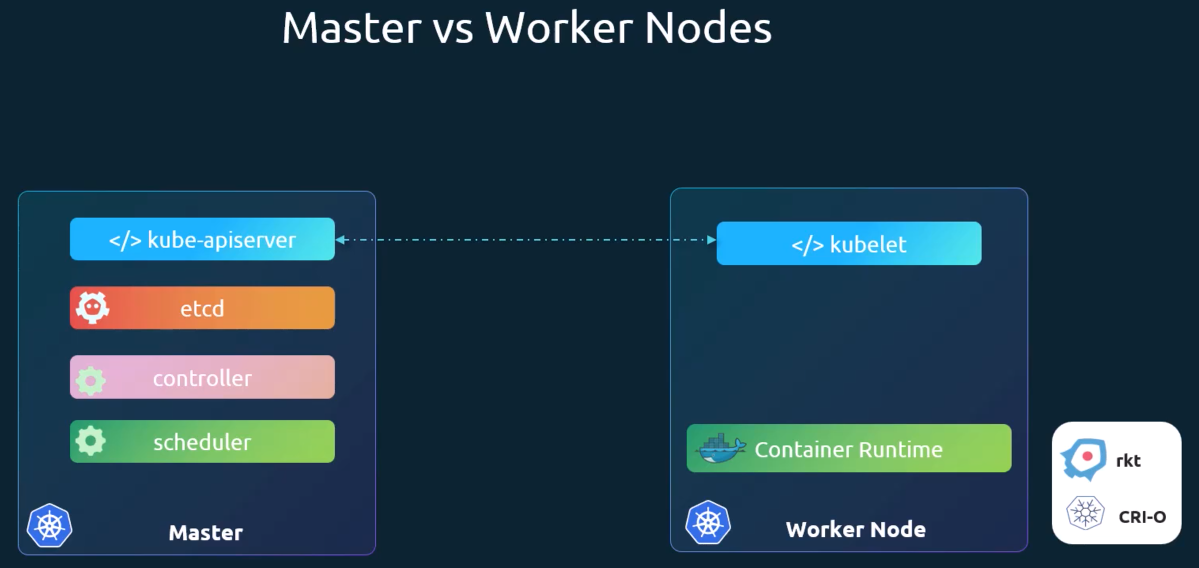
- API Server - acts as the frontend for Kubernetes
- etcd service - key value store/database
- Kubelet service - agent that runs on each node in the cluster
- Container Runtime - underlying software required to run containers
- Controller - responsible for noticing and responding when a node or container goes down
- Scheduler - responsible for distributing work or containers across multiple nodes
- Looks for newly-created containers and assigns them to worker nodes
- Master vs. Worker Nodes
- Kubectl
- Used to deploy and manage applications on a Kubernetes cluster
kubectl run hello-minkube- used to run container in clusterkubectl cluster-info- used to get information about the clusterkubectl get nodes- used to get information about the nodes in the cluster
Docker vs Containerd
- Docker was (and still is) the most prevalent container runtime, but at some point a set of standards were defined and Docker was not built to fit within those standards, so dockershim was created to continue to support Docker
- CRI (Container Runtime Interface) was created by OCI (Open Container Initiative)
- Version 1.24 of Kubernetes removed support for Docker completely, but images continued to work because they followed imagespec from OCI
ctr- comes packaged with containerd- Not very user friendly
- Supports limited features only
nerdctl- provides a Docker-like CLI for containerd- supports Docker compose
- supports newest features in containerd
- encrypted container images
- lazy pulling
- P2P image distribution
- image signing and verifying
- Most commands are the same as Docker
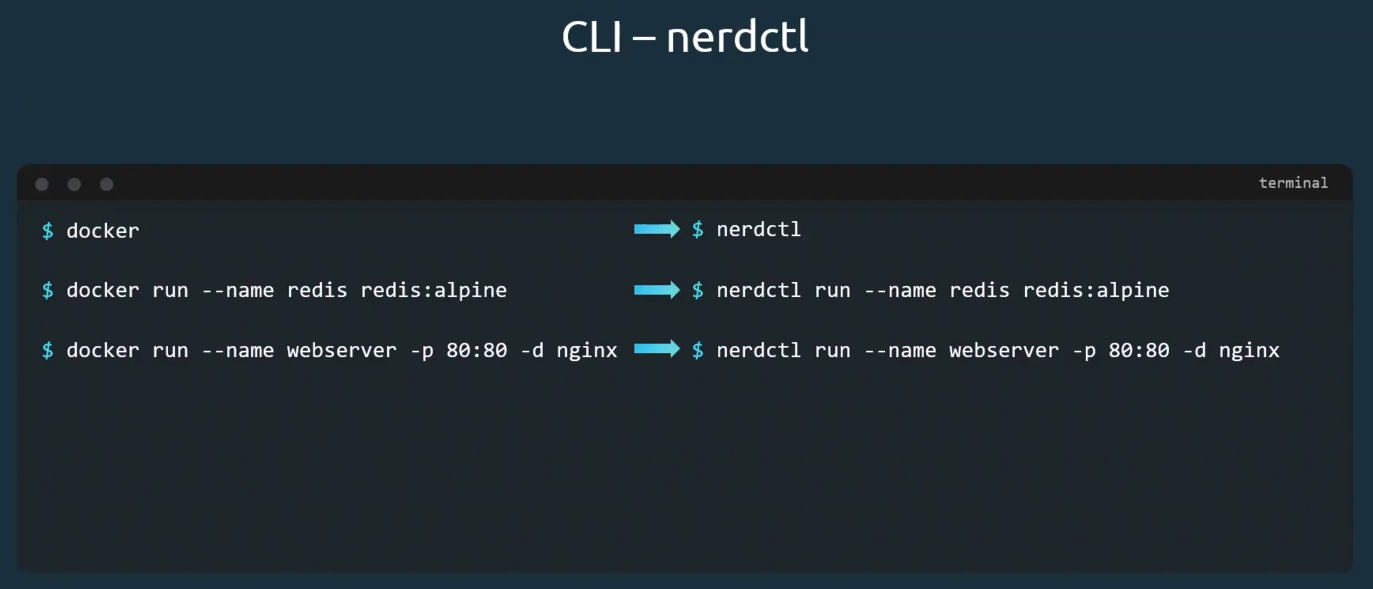
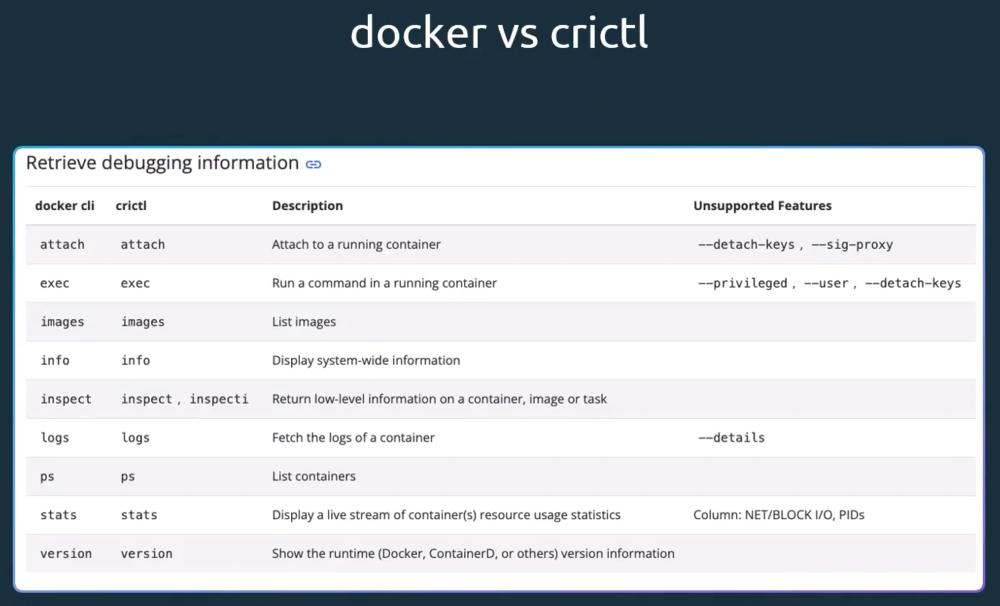
crictl- provides a CLI for CRI-compatible container runtimes- installed separately
- Used to inspect and debug container runtimes
- Not to create containers ideally
- Works across different runtimes
Pods
- A pod is a single instance of an application, and the smallest object you can create in Kubernetes
- Pods usually have a 1:1 relationship with containers running your application
- To scale up, you add an additional pod
- To scale down, you delete an existing pod
- You do not add more containers to an existing pod to scale
- Multi-container pods can have helper containers doing a supporting task such as processing user upload, database, etc.
- Without pods, when a container is deployed with a helper container, a map/database would need to be maintained to identify which app and which helper container are tied together, keep track of network addresses, storage, etc. - Pods and Kubernetes maintain this segmentation for us automatically
- When an app is deployed, a helper app would also need to be manually deployed alongside it
- When an app is deleted, the helper app would also need to be manually deleted to free up space and resources
YAML
- See Crash Course: Kubernetes for Absolute Beginners Course Notes for more info on YAML
Pods with YAML
- See Crash Course: Kubernetes for Absolute Beginners Course Notes for more info on Pods with YAML
Replication Controllers and ReplicaSets
- Replication controllers help provide high availability by running a defined number of instances of a pod on the node
- Can be multiple instances, or can create a new single instance if the running version crashes/gets deleted
- Load Balancing and Scaling
- When number of users increases, more instances of a pod can be created to split the load across the node or nodes in cluster
- Replication Controller vs. ReplicaSet
- Replication Controller is older technology and is being replaced by ReplicaSet as the new/recommended way to set up replication
- Labels and Selectors
- ReplicaSet is monitoring pods to know whether the correct number of pods are running, to spin up more or scale down if needed
- Labels and Selectors let the ReplicaSet know which pods to monitor
- Scale
- To scale replicas up or down, there are a few ways to accomplish it:
- Edit the
replicaset-definition.yamlfile and changereplicasto whatever number is desired and then runkubectl apply -f replicaset-definition.ymlto apply - Can also run
kubectl scale --replicas=6 -f replicaset-definition.yamlto modify directly - The command
kubectl scale --replicas=6 replicaset myapp-replicasetwill work as well, HOWEVER this will not update the replicas value in thereplicaset-definition.yamlfile - Also options to scale automatically based on load that will be covered later
- Edit the
Deployments
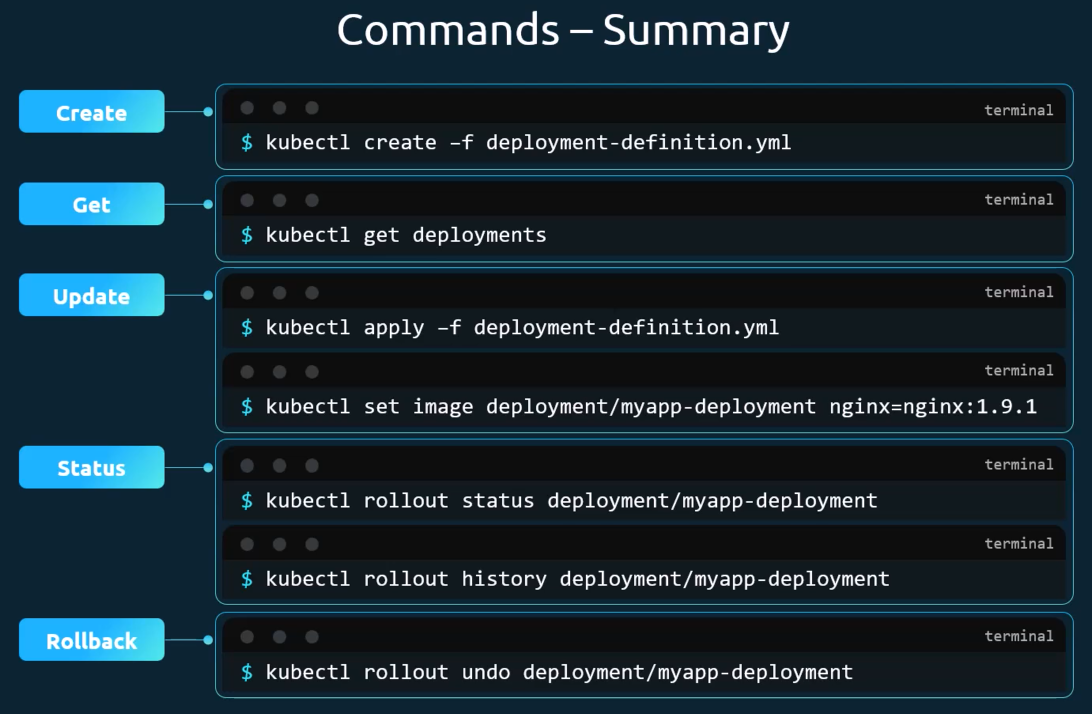
- Deployments allow for automatic download of new versions, upgrading to the new version, rolling updates, rollback if issues, pause until all changes are entered and then processing all changes at once
- They are a level higher than ReplicaSets
- YAML file is very similar to ReplicaSets except kind is Deployment (case sensitive)
Deployment Updates and Rollback
- Strategies:
- Recreate - delete all existing instances and create new instances with the updated version
- Downside to this is that there will be downtime
- Rolling Update - delete one instance and re-create it one-by-one
- No downtime - this is the default strategy
- A deployment with a rolling update strategy will create the existing resources in a ReplicaSet, and then create a second, new ReplicaSet and spin up the new versions there and delete the old version from the first ReplicaSet
- Rollback strategy
kubectl rollout undo deployment myapp-deploymentwill undo the rollout and roll back to ReplicaSet 1 with the older version installed and destroy the pods in the newer ReplicaSet
Networking in Kubernetes
- Nodes in Kubernetes get an IP on your local network
- Pods get an internal IP in the 10.x.x.x range such as 10.244.0.0
- Kubernetes expects that all containers/pods can communicate with one another without NAT
- All nodes must be able to communicate with all containers and vice versa without NAT
Services
- NodePort - service makes an internal port accessible on the node’s IP
Portis mandatory- If you don’t provide a
TargetPort, it is assumed to be the same as thePort - If you don’t provide a
NodePort, a free port in the 30000-32676 range will be assigned
- If you don’t provide a
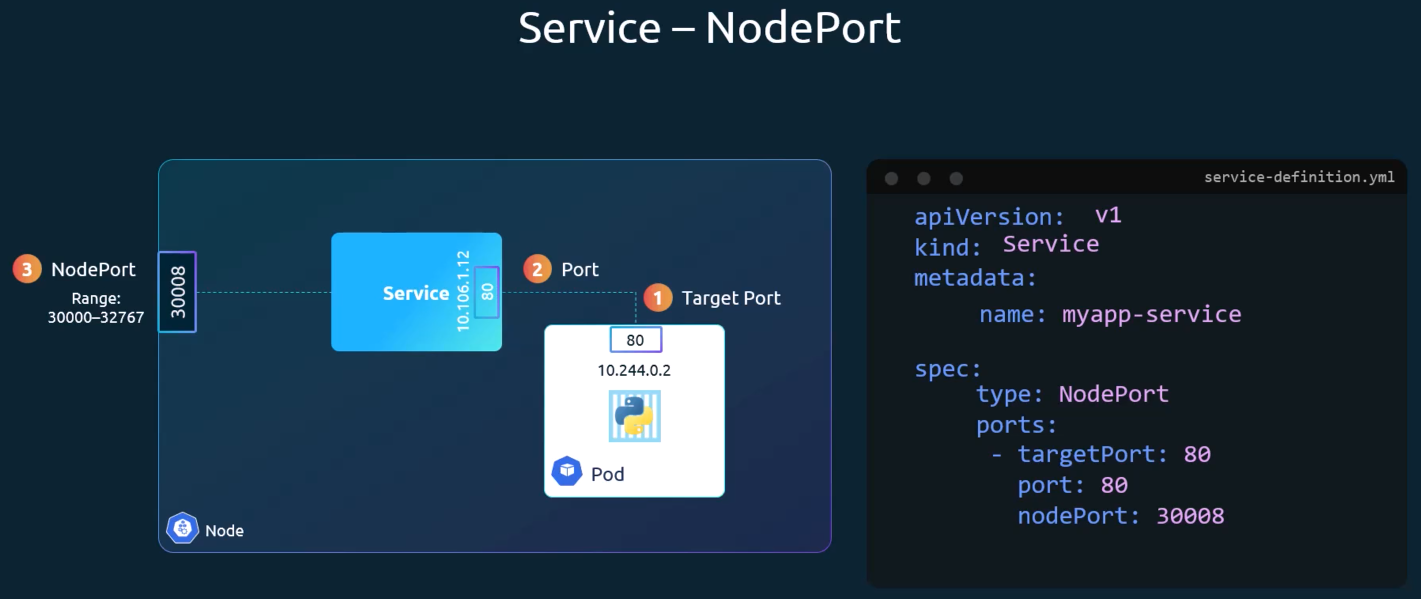
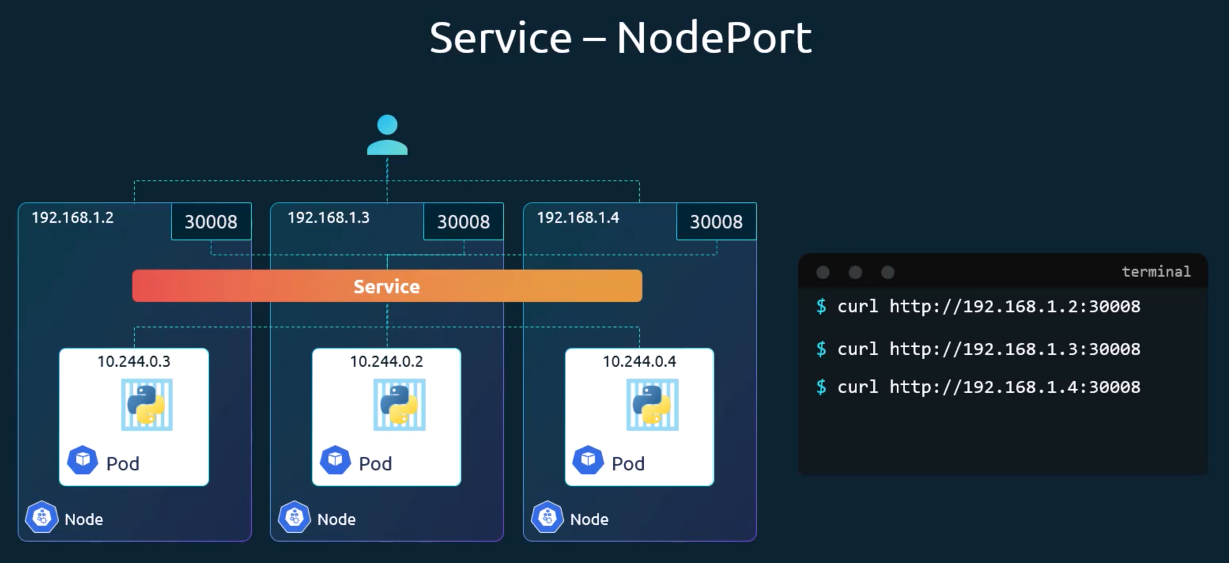
- ClusterIP - service creates a virtual IP inside the cluster to enable communication between frontend servers and backend servers
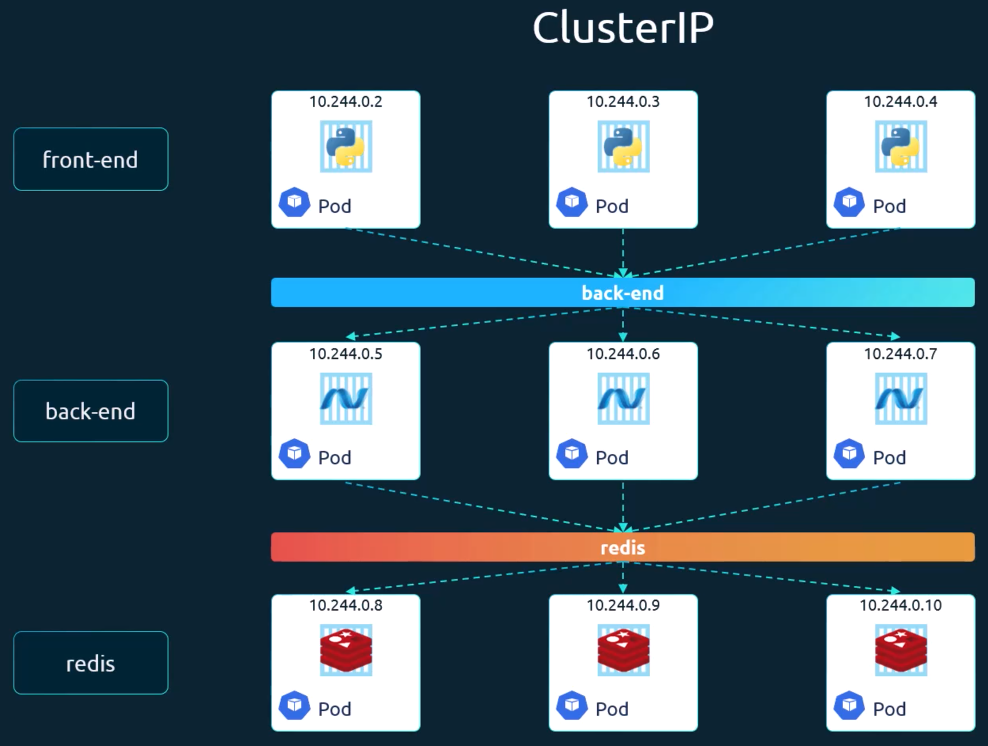
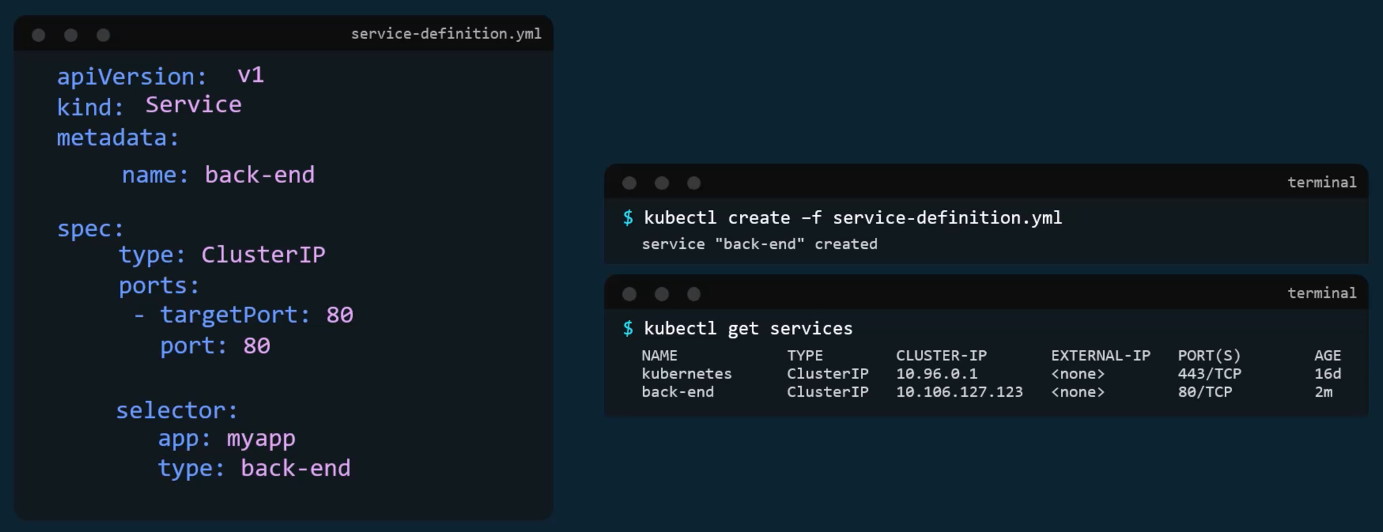
- Load Balancer - provisions a load balancer for the application in supported cloud providers
With multiple of the same type of .yaml file in a directory (deployments, pods, services, etc.), to deploy all of them at once use the command:
kubectl apply -f .