Kubernetes Crash Course for Absolute Beginners
https://youtu.be/s_o8dwzRlu4?si=CoH7vsAVjInQCJaG
Official Definition
- Kubernetes is an open-source container orchestration tool that was developed by Google.
- It helps manage containerized applications in different deployment environments.
Problems Kubernetes Solves
- Trend from monolith (1 app running on 1 VM or 1 computer/machine) to microservices
- Increased usage of containers
Features of Kubernetes
- High availability or no downtime
- Scalability for high performance
- Disaster recovery - backup and restore
Kubernetes Architecture
- Node - virtual or physical machine
- Master Node/Control plane and worker nodes
- Worker nodes are where the work is actually happening
- Master Node runs important Kubernetes processes
- API Server - the entry point to the k8s cluster
- Controller manager - keeps track of what is happening in the cluster
- Scheduler - ensures Pods placement
- etcd - configuration data, status, etc. of each node and container
- Virtual network - spans all nodes that are part of the cluster
- Master node typically has lower/fewer resources because it is not running workloads
Main Kubernetes Components
- Node and Pod
- Node is virtual or physical machine, and Pod is the smallest possible unit in Kubernetes that runs a container
- You only interact with the Kubernetes layer, not the containers directly
- Usually 1 application per pod, but helper pods can be run in the same pod as a primary app/container
- Each Pod gets its own IP address, and that IP address can change if a Pod fails or is deleted and re-deployed
- Service & Ingress
- Service has a permanent/static IP address attached to each Pod
- Service IP stays the same even if Pods are deleted and re-provisioned
- Ingress takes requests and forwards to the appropriate service
- ConfigMap & Secret
- ConfigMap is an external configuration of your application
- Secret is also an external configuration of the application, but is used to store secret data (usernames, passwords, API keys, certificates, etc.) in base64-encoded format, but encryption by a 3rd party tool is expected as well and not included in Kubernetes
- Volume
- Attaches physical storage to your Pod so that the data stored within the Pod/container is persistent and can survive restarts, deletes and re-deploys, etc.
- Can be local, remote (NFS), or cloud-based
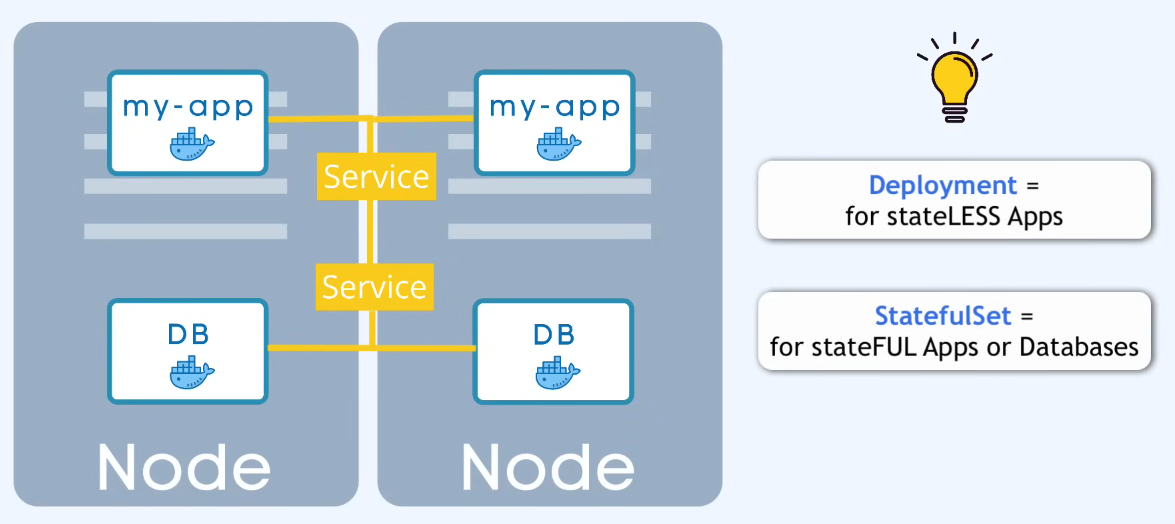
- Deployment & StatefulSet
- Deployment is a defined blueprint for Pods
- Specify how many replicas you want to have
- Abstraction of Pods - you manage deployments and not individual pods
- If a pod goes down, the service can load balance and send requests to another one that is still up
- DB pods cannot have their storage managed via deployments because they are stateful and require external storage and StatefulSet
- For MySQL, Elastic DB/Elastic Search, Postgres, Mongo DB, etc. where only one pod can be writing to it at a time
- StatefulSet deployments of DBs are not easy, which is why they are often hosted outside of the Kubernetes cluster
Kubernetes Configuration
- Requests via CLI (kubectl), UI (web UI) or API all enter through the API server which runs on the Control Plane
- This is the only entry point into the cluster
- Attributes of
specare specific to thekindof object being created - Deployment and service are commonly found in the same config yaml file because every deployment will need a service and it makes sense to bundle them together instead of needing 2 separate config files.